July 11, 2011 2 replies

The list article backlash

It’s begun.

Actually, since list-style blog posts on design trends and other pretty things have been popular for a few years now, I’m sure the backlash has been happening for a while.

Now, it does make sense to organize your a complex article into easily digestible chunks, especially in a not exactly 100% comfortable to read environment such as the Web. It’s good to keep tabs on great new typefaces and graphics in your arsenal.

However, list articles have gained a bad reputation for other reasons because quality is put on the backburner. And there are a number parties responsible:

  1. The marketers: It’s easy to thank SEO for this phenomenon. A significant portion of internet marketing involves social media, and high-traffic sites like Digg just love the list format. It’s killer linkbait.
  2. The readers: The problem is lists don’t always contain what people need to truly learn. A lot of these people don’t know any better, and the explosion of lists distracts them from laying the foundations first.
  3. The internet: Why? There are great lists out there; people will need to separate the wheat from the chaff. But maybe, it’s the very nature of the Web that mutates the need to find the good stuff into the need to find as much stuff as possible or the quickest, easiest solution to a problem.
June 2, 2011 say something

rel, rev, and HTML5

Here’s the conclusion that all the web gurus seem to have drawn over the past months: HTML5 is the future, and that future is slowly creeping into our midst. This article by Dave Shea is the latest proof of that. Then there are inspiration galleries and blogs dedicated to the use of HTML5 for markup, plus hardly any mention of XHTML2 anywhere else.

rel and more meaningful links

But I’m not going to get into the war between the two here; I’ll just focus on a specific development in the arena: link relations. There’s more to it than rel=stylesheet and rel=alternate. About a dozen more.

For example, the Google-imposed rel=nofollow will be officially added in HTML5, but the seemingly convenient rel=feed may be dropped due to browser implementation. Other interesting link relations mentioned are rel=search, which obviously points to a search page, and rel=sidebar, which refers to a document “shown in a secondary browsing context (if possible), instead of in the current browsing context.” More are being proposed here, including rel=accessiblity.

rel seems to be what plugins are to web browsers, so it’s interesting to see how they can make a markup language as extensible as possible.

rev and a less rotten web

Still related to link relations is the rev attribute, which stands for a “reverse link”. It hasn’t been as popular as its cousin rel up until microblogging boomed, and consequently, URL shorteners and the threat of link rot.

Considering just how popular Twitter is these days, particularly as a social media marketing and SEO tool where links are the mode of currency, using rev=canonical to indicate one URL is a shortened version of the other:

Google introduced rel="canonical" recently. It’s a way of pointing from an alternate URL back to the canonical URL of the current document: the relationship of the linked document to the current document is “canonical”.

If you’re linking from the canonical URL to an alternate URL (like, say, a shortened URL), you could use rev=”canonical”: the relationship of the current document to the linked document is “canonical”.

People are also advised to check long URLs at this RevCanonical app to determine whether they already contain shortened ones.

April 14, 2011 say something

Two extreme approaches to social media, which side are you on?

New year, new decade. But we still haven’t gotten past everything Web 2.0. We’re still dealing with the consequences of the social media revolution. The question is, which side are you on?

Pull the brakes?

Web 2.0 Suicide Machine

We’ve seen people dumping Facebook and still not getting the Twitter mania, but here’s something pretty recent: the Web 2.0 Suicide Machine is making the meme rounds for those who suffer from social networking overexposure.

Most of the time we just hop on the bandwagon, publish the smallest details of our lives with abandon, and regret our actions only when it’s too late. Sites like My Parents Joined Facebook and Lamebook capitalize on those slip-ups, and we’ve all heard stories of people getting fired for something they posted online. A clean break from it all could be the answer. Or an exaggeration.

Interestingly though, Facebook has blocked the Suicide Machine. Thanks for playing!

Shift into high gear?

Swiss Miss tweet

Tina Roth Eisenberg a.k.a. Swiss Miss tweeted that her unborn son already has a “gmail account, 3 domain names and a twitter account”. Pretty sweet, I’d say.

Again, this isn’t really a new phenomenon, but not many people are looking that far ahead. After all, who knows what the Web will be like in five to ten years. If domain names will still be the way to access websites.

Or maintain cruising speed?

Most of us probably lie in the middle and won’t think to axe their accounts or be so protective of their online identities as though they were real estate. Even if your new year’s resolution for social networking isn’t anything drastic, it’s still important to stay on top of your privacy concerns and online persona. Have you tweaked Facebook’s Privacy Settings yet? How about all the authorized third-party apps that have access to your Twitter account? Do you Google yourself every once in a while to see how other people find and paint a picture of you?

Bonus: try integrating a workout into those beloved websites. Now there’s a productive idea.

February 9, 2011 2 replies

Why do blogs screenshot tweets?

I’ve noticed this trend to screenshot tweets instead of copy-pasting their texts in blockquotes for some time now. On web design and technology blogs, no less. You’d think these sites who constantly write articles about HTML, CSS, web standards, usability, semantics would actually listen to their own advice.

What do people get out of doing it, though? Is Twitter really that much of a game-changer that you can now break the conventions of quoting people in articles on websites? Is it really that big of a deal to debate on how you should add tweets to articles—which is so obviously linkbait?

Are tweet pages designed so much prettier than your default blockquote designs that you feel compelled to use them instead (that’s definitely an “unsuccessful designer trend” isn’t it)? Though, consider the construction: large text, a clear indication of who said the tweet, and a fuzzy timestamp. Maybe that’s what blockquotes should aspire to be?

Are tweets such special data forms that you need specialized plugins and scripts like WP Quote, Twickie, QuoteURL to display them? Or do those exist to up one’s geek cred and feed the third-party Twitter apps machine?

Still, those aren’t as bad as web apps like tweetshots. Want to share a tweet on Tumblr? Use the Quote post type. WordPress is getting custom post types in its next major release too. But publishing platform or no publishing platform, that’s what the HTML tag <blockquote> is for.

Let me channel Steve Ballmer and say: Blockquotes, blockquotes, blockquotes, blockquotes, blockquotes. They’re not that hard to use, certainly not more than taking a screenshot and uploading it.

I understand why on some occasions using images instead of text and other data formats is preferred. They’re usually more portable when passed around in email, forums, social networks, and other communication platforms. More people know how to deal with images than URLs too. But for the purpose of quoting tweeple on websites, I see no excuse for displaying text as images.

I’ll spell it out for you in <strong> and <em>: display text as text, not as images, damn it!

Sure, screencapping tweets may not be as grave a sin as using tables for layouts, but back when that was the dominant method of creating websites, it was a pragmatic choice to make do with the technology available. The choice to use images for text is illogical today. It is confusing behavior that is inexplicably linked to Twitter’s success.

January 31, 2011 5 replies

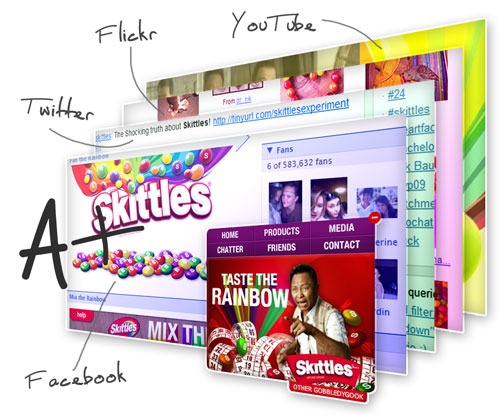
Skittles + Social Media = Priceless (From the Archives)

Skittles on Facebook, Twitter, Flickr, YouTube

Skittles on Facebook, Twitter, Flickr, YouTube

Years from now, people will look back to the day Skittles ditched its flashy site and chose to load the top social websites that talk about it instead.

I can’t even begin to fathom how brilliant a campaign this is (despite being pioneered by Modernista exactly a year before). Maybe it’s not. I don’t know whether it’s so open-minded and fun, it doesn’t even look like a gimmick anymore or it’s just plain lazy to put the Skittles-related Twitter, Flickr, YouTube, Facebook, and even Wikipedia pages right on Skittles.com.

The cynical

Why load tweets, photos, or videos if you can just pull them via the the sites’ ever-useful APIs and create a page that’s sprinkled with 100% more colors and candy? (Come on, don’t deprive web designers and developers of their jobs!)

Is it even legal for a company to load another company’s web page to promote itself? (But asking that is like saying Facebook owns whatever you post on its site, and we all know how that turned out.)

Is seeing yourself on Skittles.com enough incentive to build buzz about the product instead of the marketers who will be handsomely rewarded anyway? (A resounding yes if you’re one of those new media douchebags, but let’s get to that in a bit.)

Do these cynical questions even matter if you’re enjoying the experience anyway?

The self-absorbed

Skittles took a risk. Some other company would have been worried about the possibility of smack and smut polluting the streams.

It’s bound to happen anyway, if this campaign lasts long enough and the new media douchebags pounce on another pure phenomenon taking place. I think that’s what draws people to this experiment. It’s raw, unfiltered, and free from any sinister intentions. (At least to the naked eye.)

Remember when SEO hadn’t been invented? When Wikipedia was an unbiased reference? When Twitter was all about what you are doing right now? When your friends on Facebook didn’t have their own fan pages?

And what about the other side of that purity—the cold, hard, messy truth? Because it’s only a matter of time when Skittles, which is not just sweet, innocent, colorful candy, but also a huge corporation, rakes up some dirt in its dealings.

If there’s one thing to take away from all this is that if you’re a company and dreaming of pulling off something like this, it’s not about you. (Or maybe it is, but can you at least try to make it look like it isn’t?)

Any publicity is good publicity, order will emerge from chaos, and worry less about projecting a reality distortion field, focus more on making your product great, because it will speak for itself.

January 21, 2011 say something

Holding a Conference? Spice It Up With These Geeky Ideas

The mark of anything well-made is found in the details, and when it comes to geeky conferences for designers and developers, organizers are coming up with geeky new ways to spice up the offline event experience.

Badges

Gravatar-enabled WordCamp Badges

Gravatar-enabled WordCamp Badges

Let me first say that Gravatars, or globally recognized avatars, should be a staple in every social network or web app that lets uses upload avatars, because why upload one everywhere when it can be pulled from a centralized location?

Now combine Gravatar with sister application WordPress, specifically its conference WordCamp, and you’ve got brilliant automated way to print photos on conference badges. The best part is you can download the source code!

Creative Mornings Q&A Badges

What would make you a good client?

This one’s not so high-tech, but a neat little idea nonetheless, especially for smaller, more frequent gatherings such as Creative Mornings. In place of names on the nametags, participants have to fill in the blank with an answer to a certain question.

Past sessions have asked questions like “What would you like to redesign?”, “What can you teach me?”, “What would you do if you had your own storefront?”, and “What would make you a good client?” Cheap, easy, and an instant icebreaker.

Crowdsourcing

dConstruct Time Capsule

dConstruct 2009 Time Capsule

With the theme of dConstruct 2009 being Designing for Tomorrow, it makes total sense to come up with a Time Capsule competition, where the best entry wins free passes including hotel accommodations and a seat at the speakers dinner.

The question is simple: “What do you see that you would like to preserve for the future?” but it also underscores how important understanding the past and present is in order to build for the future. Especially when it comes to the Web.

SXSW Panel Picker

SXSW PanelPicker

For such a massive event as the South By Southwest (SXSW) Conferences and Festivals, tapping into the wisdom of the masses makes sense. Not only does the SXSW PanelPicker increase interactivity by letting the participants vote for the talks that will go live, but it also builds extra buzz as the speakers themselves campaign for their own panels.

Twitter & Co. Mashups

MIX09 Flotzam

MIX09 Flotzam 6

These days everybody is contributing to the coverage of any one event, and it’s even more awesome to experience that collaboration during instead of after the fact. Mashups such as Flotzam grabs streams from Facebook, Flickr, YouTube, Digg, Twitter, and the blogosphere. This one looks especially nice with the Tetris skin, which was originally built for Microsoft conference MIX09.

Read more about the process here. Grab the .NET and Silverlight source code here.

Carsonified @HelloApp

Carsonified @HelloApp

@HelloApp, which debuts at the Future of Web Apps – London 2009, lets conference-goers meet new people via Twitter. First you tag yourself during check-in, earn badges and points for meeting new people and completing certain tasks, and browse the seating chart according to professional background (design, development, PHP, Rails).

A perfect blend of socializing and tweeting at the same time. Read how Carsonified created it.

What’s your great idea?

Got a great conference idea already executed, or still brewing? The moral of the story here: don’t leave your geekiness behind when you go offline. Embrace it, because it makes things a hell of a lot more interesting.

May 14, 2010 2 replies

Go origami: fold your designs away

The three-dimensional, folded look hailing from the fascinating art of origami has been circling my design radar for a while now now. Let shop around for a bit of inspiration and see how you can inject it in your own work.

A really short history of Origami

Giant Camphore Tree Shimenawa (Detail) Atsuta Shrine Nagoya, Japan

Origami is a Japanese word that literally means “folded paper”. While the term itself showed up only as recently as 1926, it’s been around much longer, as the use of cut and folded paper was first used in religious rituals. It was during the Heian period, when paper became a more abundant commodity, that origami branched out into a form of entertainment. There is documented proof that paper folding developed independently in Europe as well.

Get the look

Tori's Eye

The easiest way to go origami is to use imagery that actually follow how folded creatures and objects look like. In this case, the website Tori’s Eye uses birds. It takes a step further and gives different textures to the background to match the playful, crafty feel. Top it off with some JavaScript animation and you’ve got yourself a stunning origami-inspired website.

ASOS plc

This one is a less literal interpretation of the origami look. The idea is to use a lot more diagonal lines instead of just perpendicular and parallel ones. The shapes behind the main content area seem to be mimicking sheets of paper stacked together, but keep it abstracted with transparency effects. This happens again in the background.

Ian Soper

Ian Soper’s site looks it has a long sheet of paper with many folds standing upright. Spreads for iPad does the same thing, but vertically.

Fonts

Choose more angular, abstract typefaces for a nice origami effect in text. There are a ton of origami-inspired alphabets out there, so I’ll just list fonts you can actually use:

Origami font by Formfound (Peter Fritzsche)
Origami font by Formfound (Peter Fritzsche) (free for personal use)

Cube font by Fontfabric

Cube 02 font by Fontfabric

Quad font by Fontfabric

Facet font by Fontfabric

You can also use dingbats and other similar accents:

Origami Bats dingbat font by Lauren Ashpole
Origami Bats dingbat font by Lauren Ashpole (free for personal use)

Logos

Simpla logo

Color and shade are playing a bigger part in current logo trends so it’s no surprise that illusions of three-dimensional effects, including folded shapes, are popular right now. The logo for Simpla CMS is one such example.

Folded logos by TKhoury

These logo concepts by TKhoury actually use the folded effect to convey more meaning.

Some closely related techniques to be inspired by: cubism, facets, hexahedrons, ribbons, quilts, mosaics, optical illusions.

Icons

Twitter origami icon by Paddy Donnelly

This social media icon set by Paddy Donnelly is a breath of fresh air from all the other ones out there. Adding these to websites short of mandatory lately and if you’re adventurous enough, why not go for this almost abstract look? Or make your own—it’s a great exercise for deconstructing recognizable logos.

Buttons

I know that rounded corners, especially with “the new (CSS3) hotness”, are not only trendy but have also been psychologically proven to appear more friendly and thereby more clickable, but you can still apply the basic idea of making sure a button looks like a button while retaining a more geometric, less marshmallowy feel: use gradients, bevels, and shadows.

spiky buttons

You could even go the opposite route and apply the sharper edges on buttons you don’t want users to click, which Jeff Atwood calls The Opposite of Fitts’ Law:

Uncommon or dangerous UI items should be difficult to click on!

The spiky button is an exaggerated example, but the idea is sound: apply the less welcoming look of hard edges on the buttons you don’t want users to click on.

Backgrounds

z8

It’s the easiest and most recognizable way to incorporate a certain look in a design, and you can pick from a variety of options: patterns, textures, or photographs.

Mediasoldier

Mediasoldier uses a folded paper pattern in the header background that really captures that origami feel but also matches the grungy and grid-loving look of the site. It also mixes with two other backgrounds: the striking cracking concrete wall, and the subdued diamond fence.

Other Design Touches

Cogaoke

Will graphics be prominent in your design? Give them a 3D twist. The illustration on Cogaoke is an excellent style. Bonus points for imitating Japanese character styles in the text “happy”.

Cleverclick

Dog ears and page curls can be elegant additional touches instead of distracting and annoying. And although Cleverclick’s design isn’t so obviously origami-like anymore, the still exudes its minimalist, organic sensibilities.

Fold away

Origami is a great design concept to build upon. Experiment with shapes, shadings, and space to come up with an edgy look—literally.

April 20, 2010 say something

The designer-comic artist hybrid (7 strips you should be following)

Blame it on the need to express oneself in as many avenues possible, or the tendency for this community to navel-gaze out of narcissism or frustration, but you can’t deny how comic strips are a brilliant outlet for these designers. Each carries a different subject, sense of humor, and illustration style that you’ll want to subscribe to all of them.

Brad Colbow: The Brads

Test How Your Site Looks on the iPad

Brad’s also been tapped to create more informative strips such as Learning About Contrast in Design and Misunderstanding Markup: XHTML 2/HTML 5.

Kyle Weems: CSS Squirrel

Push To Dispense Free Cheese

I’ve mentioned CSS Squirrel when he announced his branching out to podcasting, but poking fun at the latest industry developments and insider info is where he shines.

N.C. Winters: Freelance Freedom

The Design Process

NC goes through the ups and downs of freelancing at Freelance Switch’s Freelance Freedom.

Business Guys on Business Trips

Client De-briefing

BGOBT tells the most awful office tales in detailed narrations but minimal line art.

Matthew Inman: The Oatmeal

How a Web Design Goes Straight to Hell

The man behind Mingle2 and SEOmoz, Matthew has gone on to create humorous quizzes and infographic-style comics at the very viral The Oatmeal.

Phil Thompson: The FrontEnders

Should Web Designers Code HTML?

Phil does a front-end spin on the British soap The Eastenders.

Ricardo Gimenes: Behind the Websites

Front-End design conference

Ricardo creates a fleet of colorful characters to represent different websites, and now makes strips for Smashing Magazine’s The Smashing Cartoons.

April 18, 2010 one reply

Growth & transparency make Twitter easier to use

Evan Williams: Twitter Is Too Hard

Amidst all the exciting and controversial new directions Twitter is taking since they’ve been announced at the Chirp conference, one stands out: Ev Williams admitting that “Twitter is too hard too use”, even mentioning that the phrase “I don’t get Twitter” is the second suggested search in Google.

After all these years of the pundits identifying Twitter’s strength and eureka moment to be its simplicity, Ev’s statement says a lot about the company. They could have skipped over this detail or worded it in some other way, but talked about it anyway. Sincerely and transparently.

We’ve known this for a long time, but it was growing too fast for us to address these issues.

There are several lessons rolled in here. Despite all of Twitter’s growth in usage and features, they still don’t want to drop the ball on simplicity even if other products probably would have, because they can afford to.

Fast. Obvious. Easy.

But simplicity doesn’t only mean keeping the number of features at a minimum; it also means being intelligent enough to anticipate what users need. The way Twitter is built makes it into “different things for different people”—hence the explosion of 3rd-party apps and the creation of its own jargon. Retweeting, hashtags, trending topics, recommended users, and lists were all created arbitrarily by the community later on integrated as real features. Now the company is pushing further in location awareness, mobile, infrastructure, and APIs.

As long as there’s this open dialogue among the founders, the users, and all the developers, Twitter will remain as inspiring and innovative as ever.

December 14, 2009 say something

Design & development advent calendars for the holidays!

Haven’t gotten into the holiday spirit quite yet? Perhaps these design and development focused advent calendars will do the trick. Come to think of it, it should do even more than that; you get a treat every single day for 24 days straight. Sounds even better than Christmas day? Almost.

24 ways

24ways

This site may not have started the “geeky” advent calendar trend, but it has certainly built an excellent reputation and tradition for web designers everywhere. The design continues to be cutting edge and inspiring as well.

PHP Advent

PHP Advent

All PHP, all holiday season long. See also the Perl Advent Calendar. (There’s a Rails one too, but the original post seems to be missing now.)

SitePoint Christmas Advent Calendar

SitePoint Christmas Advent Calendar

Few things are better than a holiday sale, and this advent calendar themed bazaar by SitePoint looks great. The format is pretty clever too: each offer lasts for only 24 hours, and you won’t know what products come on next.

WP Engineer WordPress Advent Calendar

WP Engineer WordPress Christmas Advent Calendar

Here’s one for the WordPress lovers, made by no less than WP Engineer. I hope that next year this becomes a community-wide effort as with the PHP Advent Calendar. Archive here.

Social Media Advent Calendar

Social Media Advent Calendar

A great crash course, if you will, into everything about social media. Not quite for designers or developers, but a great resource nonetheless.

Lists done better?

Writing this article made me realize this could actually be a way to create better list articles. Instead of cramming everything in and bombarding your readers with one long, heavy post, create a series. Exercise patience and restraint on your part and theirs. Keep them coming back for more.

Once you’ve reached your quota, do a round-up, and store the past articles in a safe place. They can even be realigned or revisited (hopefully not like recycled fruitcake, mind you) when the holidays come around again. Of course you can write all year long, but the idea is also avoiding predictability and knowing when to make things special.

And speaking of which, may you all have a special holiday season this year!

/* */